

Cyber Resilience
Why Backup Is Just the Starting Point for SMBs
Discover how cyber resilience for SMBs goes beyond backup to help recover critical operations faster and keep business moving.
Key takeaways 6 min read
-
- Why having a “backup” and being able to “recover” aren’t the same thing.
- How to develop a cyber resilient foundation with a lean IT team.
- How to pressure-test your own recovery readiness in three questions.
It is 6:47 am on a Sunday morning, and the first thing you see is not an email — it’s a ransom note. Your files are locked, production is down and the backup routine you have quietly trusted has never been tested under real pressure.
For small and mid-sized businesses (SMBs), just having backups is not enough.
Enterprises aren’t the only organizations that need cyber resilience. SMBs often operate with lean teams, limited tools and less time to validate recovery plans through regular testing. As a result, they may be less prepared than larger organizations to recover quickly and confidently when disruption occurs.
SMB IT teams wear many hats, and when disruption hits, one question decides everything: how fast can we get running again? Every hour offline costs real money: lost revenue, stalled operations and customers who go elsewhere. Larger organizations may have more resources to absorb that disruption; an SMB likely can’t absorb the impact.
Many organizations assume they’re protected because they have backups, but a backup that can’t be trusted or recovered provides little value during a cyberattack. Modern resilience requires more than copies of data. It requires immutable protection, data integrity validation and the ability to confidently recover systems and operations when they matter most.
Backup is important. Recovery is the real test.
Many SMBs assume that if backups exist, recovery is covered. It rarely is. A backup is a copy of data. Restoring data is the technical act of getting data back from that copy. Cyber resilience is the broader ability to validate that data, restore applications and systems and recover operations with confidence after an attack, including when attackers target the backup systems themselves.
IT teams need to take snapshots that capture data at specific points in time. Snapshots do valuable, everyday work, but a snapshot is one layer, not the whole protection strategy. When snapshots are stored on the same storage system as the live data the team is copying — whatever takes that system down can affect the snapshot too. Put plainly: a copy that shares your system’s fate is not enough to support recovery on its own. Here’s how primary storage snapshots and separate, protected copies fit together:
Two layers, one strategy
Two kinds of copies, built for different jobs. Being ready means having both.
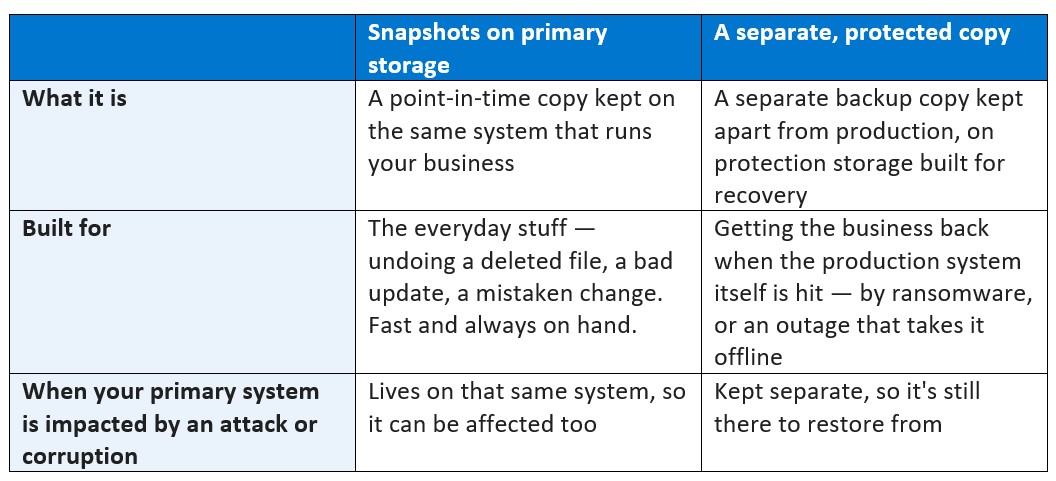
Neither layer replaces the other. Snapshots keep everyday recovery fast and simple; a separate, protected copy can provide an additional recovery source if production is compromised. That combination, along with data-integrity validation, tested restore procedures and a plan to recover applications and operations, goes further toward supporting cyber resilience. The right combination depends on where your data lives, your recovery objectives and how your business operates.
Right-sized resilience, not one-size-fits-all
The good news for a lean SMB team: you can find a solution that fits your growing business.
A great match is Dell PowerProtect Data Domain DD3410, a compact, efficient, secure, purpose-built backup appliance that works seamlessly with PowerProtect Data Manager. It keeps an immutable, protected copy of your data on infrastructure designed to support recovery in smaller and distributed environments. With proven data integrity and built-in security features that prevent backup copies from being modified or deleted, Data Domain DD3410 is well suited for smaller data centers, branch offices and edge sites in a footprint that fits how small teams work.
In addition to PowerProtect Data Manager, PowerProtect Data Domain integrates with a broad ecosystem of supported backup applications teams already trust, providing purpose-built storage for backup copies and helping strengthen recovery readiness within the environment they run today. In supported environments, Data Domain Boost (DD Boost) can help optimize data movement, allowing teams to build on familiar tools without requiring a rip-and-replace project.
Start with readiness, not assumptions
The most useful first step is an honest look at what you could actually recover today, before an attack forces the question. Ask three things:
-
- Have we identified what truly matters to the business? Not everything needs to be recovered, so focus first on the information and services that are critical to operations, revenue, customers and compliance.
- Have we secured our data with the right approach and controls? Prioritize encryption, immutability, anomaly detection and other security controls to determine your data is recoverable and hasn’t been tampered with.
- Do we test and refine our recovery plan regularly? A recovery strategy is only effective if it works in practice. Regularly test restoration processes, validate that critical systems can be recovered in the required timeframes, and update the plan as business priorities, systems and risks change.
A Cybersecurity and Resilience Assessment can help you find the gaps and prioritize practical next steps: knowing what needs protection, keeping protected copies with data integrity controls secure and separate and trusting that your team can restore data and recover applications and operations when disruption comes.
Because on that Sunday morning, the difference is not whether you had a backup. It is whether you can recover and get the business running again before the day is lost.
Frequently asked questions
Is backup the same as cyber resilience?
No. A backup shows that a copy of data exists. Cyber resilience is the broader ability to protect data, validate its integrity and recover applications, systems and operations with confidence after an attack — including when attackers target the systems your backups depend on. The first is a prerequisite; the second is the goal.
What is DD Boost, and why does it matter for SMBs?
DD Boost provides advanced integration between a large ecosystem of backup applications and PowerProtect Data Domain. It can improve backup efficiency by reducing the amount of data sent across the network, helping teams use supported tools rather than starting over. Capabilities depend on the application and configuration.
Isn’t cyber resilience just for large enterprises?
No. The need is the same for organizations of any size, but the response does not have to be. Attackers often see smaller teams as easier targets, so resilience matters just as much for SMBs. What changes is scale: a lean team can build real recovery readiness with a right-sized approach, without the cost or complexity of an enterprise program.